Pages

Showing posts with label C#. Show all posts

Monday, June 24, 2019

Cleansing Canonicalization and Comparison Errors

How to control path composition to protect ASP.NET web application from directory traversal vulnerability in C#

There is a threat for file access named path canonicalization. Canonicalization is a process for converting data in standard (or canonical) form and it refers to the action that builds a path in a safe form. The next picture shows this process:
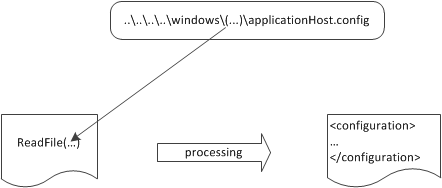
Path canonicalization in action. If an attacker passes special characters, such as ..\or .\, that user can alter the routine path and access files in other directories
Path canonicalization in action. If an attacker passes special characters, such as .. or ., that user can alter the routine path and access files in other directories
A web server is protected by default from this attack known as directory traversal vulnerability. If you have some code inside a physical directory named c:\inetpub\sitename\ and you are requesting something like https://localhost/../../../somefile.txt, the corresponding physical request will not be processed. The problem isn’t in how the web server is processing these requests, but how you dynamically compose a path. Usually in web application the path is composed by using parameter values. This method is used in different situations: from a downloading system to user-generated files, dealing with dynamic path building is a common issue. Because by default all user input is potentially evil, you have to take actions to sanitize it. Your aim is to safe system that composes a path dynamically and avoids path canonicalization vulnerability.
Parameter values used to compose paths, in web applications, are important. If you want to build a local file path by using some user input, you will end up with string concatenation or you will use the Combine() static method of the Path class from the Sysem.IO namespace. This method is very useful because it handles leading and trailing slashes automatically, but it does not deal with directory traversal. For example if an attacker passes c:\inetpub\sitename as the first part of the path and ..\..\windows\system32\cmd.exe as the second part the result will be c:\windows\system32\cmd.exe. This result isn’t the one you want, and, depending on your application’s behavior, the vulnerability might become quite dangerous.

The best approach in this case is to check for unwanted characters in the specified parameter and to follow the next steps:
1. Check for invalid characters in the parameter value by using the GetInvalidFileNameChars() method of the Path class.
2. Use the Combine method.
3. Perform a last check on the results to make sure the resulting path starts with the base path.

You can use the next code lines to implement this approach:

 private string CanonicalCombine(string basePath, string path)
        {
            if (String.IsNullOrEmpty(basePath) || string.IsNullOrEmpty(path))
                throw new ArgumentNullException();
            basePath = HttpUtility.UrlDecode(basePath);
            path = HttpUtility.UrlDecode(path);
            // Check for invalid characters
            if (path.IndexOfAny(Path.GetInvalidFileNameChars()) > -1)
                throw new FileNotFoundException("FileName not valid");
            // Use Path.Combine
            string filePath = Path.Combine(basePath, path);
            // Check the composed path
            if (!filePath.StartsWith(basePath))
                throw new FileNotFoundException("Path not valid");
            return filePath;
        }

  string path = CanonicalCombine(utils.InstructionFilesPath, fileName);

Thursday, July 16, 2015

Right and left join in LINQ


Suppose we have a table like following structure
User | age| Data |Growth
------------------------                           
1    |2   |43.5  |46.5                           
1    |2   |43.5  |49.5     
1    |2   |43.5  |48.5     
2    |3   |44.5  |                          
3    |4   |45.6  |
Assuming that you still require a left join; here's how you do a left join in Linq:
var results = from data in userData
              join growth in userGrowth
              on data.User equals growth.User into joined
              from j in joined.DefaultIfEmpty()
              select new 
              {
                  UserData = data,
                  UserGrowth = j
              };
If you want to do a right join, just swap the tables that you're selecting from over, like so:
var results = from growth in userGrowth
              join data in userData
              on growth.User equals data.User into joined
              from j in joined.DefaultIfEmpty()
              select new 
              {
                  UserData = j,
                  UserGrowth = growth
              };
The important part of the code is the into statement, followed by the DefaultIfEmpty. This tells Linq that we want to have the default value (i.e. null) if there isn't a matching result in the other table.

Monday, June 22, 2015

"Volatile” keyword

Consider this example:
int i = 5;
System.out.println(i);
The compiler may optimize this to just print 5, like this:
System.out.println(5);
However, if there is another thread which can change i, this is the wrong behaviour. If another thread changes i to be 6, the optimized version will still print 5. The volatile keyword prevents such optimization and caching, and thus is useful when a variable can be changed by another thread.

Sunday, June 21, 2015

Const, ReadOnly, Static ReadOnly and Static

Constant
Constant fields or local variables must be assigned a value at the time of declaration and after that they cannot be modified. By default constant are static, hence you cannot define a constant type as static.

public const int X = 10;

A const field is a compile-time constant. A constant field or local variable can be initialized with a constant expression which must be fully evaluated at compile time.

void Calculate(int Z)
{

 const int X = 10, X1 = 50;
 const int Y = X + X1; //no error, since its evaluated a compile time
 const int Y1 = X + Z; //gives error, since its evaluated at run time
}

You can apply const keyword to built-in value types (byte, short, int, long, char, float, double, decimal, bool), enum, a string literal, or a reference type which can be assigned with a value null.
const MyClass obj1 = null;//no error, since its evaluated a compile time
const MyClass obj2 = new MyClass();//gives error, since its evaluated at run time
Constants can be marked as public, private, protected, internal, or protected internal access modifiers.
Use the const modifier when you sure that the value a field or local variable would not be changed.

ReadOnly
A readonly field can be initialized either at the time of declaration or with in the constructor of same class. Therefore, readonly fields can be used for run-time constants.
class MyClass
{
 readonly int X = 10; // initialized at the time of declaration
 readonly int X1;
 
 public MyClass(int x1)
 {
 X1 = x1; // initialized at run time
 }
}
Explicitly, you can specify a readonly field as static since, like constant by default it is not static. Readonly keyword can be apply to value type and reference type (which initialized by using the new keyword) both. Also, delegate and event could not be readonly. Use the readonly modifier when you want to make a field constant at run time. Initialize the value in the static constructor, it gives an error.  

Static ReadOnly
A Static Readonly type variable's value can be assigned at runtime or assigned at compile time and changed at runtime. But this variable's value can only be changed in the static constructor. And cannot be changed further. It can change only once at runtime.

Static
The static keyword is used to specify a static member, which means static members are common to all the objects and they do not tied to a specific object. This keyword can be used with classes, fields, methods, properties, operators, events, and constructors, but it cannot be used with indexers, destructors, or types other than classes.
class MyClass
{
 static int X = 10;
 int Y = 20;
 public static void Show()
 {
 Console.WriteLine(X);
 Console.WriteLine(Y); //error, since you can access only static members
 }
}
Key points about Static keyword
  1. If the static keyword is applied to a class, all the members of the class must be static. 
  2. Static methods can only access static members of same class. Static properties are used to get or set the value of static fields of a class. 
  3. Static constructor can't be parametrized. Access modifiers can not be applied on Static constructor, it is always a public default constructor which is used to initialize static fields of the class.

Monday, July 25, 2011

Nested Classes in C#


class Demo
{     public static void Main()    
   {
      System.Console.WriteLine("Demo");      
      OuterClass.NestedClass nc = new OuterClass.NestedClass();     
   }
}

class OuterClass
  {
      public OuterClass()
     {
        System.Console.WriteLine("OuterClass");     
      }   
      public class NestedClass 
      {   
       public NestedClass()    
       {   
         System.Console.WriteLine("NestedClass");      
        }
   }
 }

Output

Demo  NestedClass
The above program compiles and runs successfully to give the desired output. An attempt was made to create an object of NestedClass. Therefore the constructor of NestedClass got executed. There is no reason why the constructor of OuterClass should get executed.

Wednesday, July 13, 2011

Extension Methods in C#

using System;

namespace Foo
{
   class Program
    {
        static void Main(string[] args)
        {
            Console.WriteLine(2.DoubleThenAdd(3));
            Console.WriteLine(IntHelper20.DoubleThenAdd(2, 3));
            Console.ReadLine();
        }
    }

    public static class IntHelper20
    {
        public static int DoubleThenAdd(int myInt, int x)
        {
            return myInt + (2 * x);
        }
    }

    public static class IntHelper35
    {
        public static int DoubleThenAdd(this int myInt, int x)
        {
            return myInt + (2 * x);
        }
    }
}


Source: http://www.hanselman.com/blog/HowDoExtensionMethodsWorkAndWhyWasANewCLRNotRequired.aspx