Pages

Monday, June 24, 2019

Cleansing Canonicalization and Comparison Errors

How to control path composition to protect ASP.NET web application from directory traversal vulnerability in C#

There is a threat for file access named path canonicalization. Canonicalization is a process for converting data in standard (or canonical) form and it refers to the action that builds a path in a safe form. The next picture shows this process:
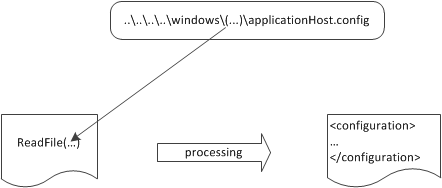
Path canonicalization in action. If an attacker passes special characters, such as ..\or .\, that user can alter the routine path and access files in other directories
Path canonicalization in action. If an attacker passes special characters, such as .. or ., that user can alter the routine path and access files in other directories
A web server is protected by default from this attack known as directory traversal vulnerability. If you have some code inside a physical directory named c:\inetpub\sitename\ and you are requesting something like https://localhost/../../../somefile.txt, the corresponding physical request will not be processed. The problem isn’t in how the web server is processing these requests, but how you dynamically compose a path. Usually in web application the path is composed by using parameter values. This method is used in different situations: from a downloading system to user-generated files, dealing with dynamic path building is a common issue. Because by default all user input is potentially evil, you have to take actions to sanitize it. Your aim is to safe system that composes a path dynamically and avoids path canonicalization vulnerability.
Parameter values used to compose paths, in web applications, are important. If you want to build a local file path by using some user input, you will end up with string concatenation or you will use the Combine() static method of the Path class from the Sysem.IO namespace. This method is very useful because it handles leading and trailing slashes automatically, but it does not deal with directory traversal. For example if an attacker passes c:\inetpub\sitename as the first part of the path and ..\..\windows\system32\cmd.exe as the second part the result will be c:\windows\system32\cmd.exe. This result isn’t the one you want, and, depending on your application’s behavior, the vulnerability might become quite dangerous.

The best approach in this case is to check for unwanted characters in the specified parameter and to follow the next steps:
1. Check for invalid characters in the parameter value by using the GetInvalidFileNameChars() method of the Path class.
2. Use the Combine method.
3. Perform a last check on the results to make sure the resulting path starts with the base path.

You can use the next code lines to implement this approach:

 private string CanonicalCombine(string basePath, string path)
        {
            if (String.IsNullOrEmpty(basePath) || string.IsNullOrEmpty(path))
                throw new ArgumentNullException();
            basePath = HttpUtility.UrlDecode(basePath);
            path = HttpUtility.UrlDecode(path);
            // Check for invalid characters
            if (path.IndexOfAny(Path.GetInvalidFileNameChars()) > -1)
                throw new FileNotFoundException("FileName not valid");
            // Use Path.Combine
            string filePath = Path.Combine(basePath, path);
            // Check the composed path
            if (!filePath.StartsWith(basePath))
                throw new FileNotFoundException("Path not valid");
            return filePath;
        }

  string path = CanonicalCombine(utils.InstructionFilesPath, fileName);

Monday, July 9, 2018

How to build angular application using Angular CLI

Following are the steps for creating and buliding application using angular-CLI

Step 1:-

Install nodeJS.

From here: https://nodejs.org/en/download/

Step 2:-

Exexute and install angular-CLI command as mentioned

npm install -g @angular/cli
npm i @angular/cli@1.4.10 -g 

steps 3:-

Install node module wth mentioned command

npm install

After successfully installation we can check angular configuration on our system with follwoing command.

ng -version

It will return following output


(Note: The version may be different based on when you install this CLI. This command returns CLI version.)

Common problems:-


If you run into any installation issue, try to update Node, NPM, and CLI to the latest version.
If downloading files is taking forever for Windows user, try running the command line as administrator.
Thank you.

Tuesday, June 19, 2018

Structural Patterns - Adapter Pattern

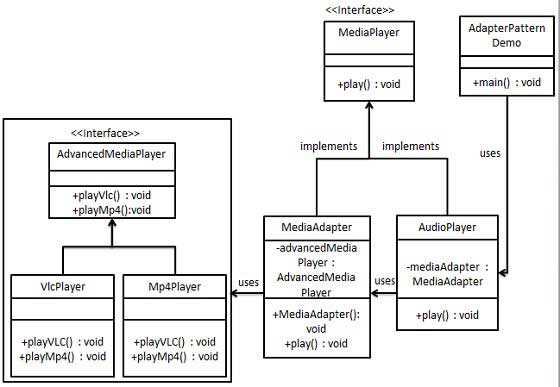
Adapter pattern works as a bridge between two incompatible interfaces. This type of design pattern comes under structural pattern as this pattern combines the capability of two independent interfaces.

Adapter Pattern UML Diagram


Step 1

Create interfaces for Media Player and Advanced Media Player.
MediaPlayer.cs
public interface MediaPlayer {
   void play(String audioType, String fileName);
}
AdvancedMediaPlayer.cs
public interface AdvancedMediaPlayer { 
   void playVlc(String fileName);
   void playMp4(String fileName);
}

Step 2

Create concrete classes implementing the AdvancedMediaPlayer interface.
VlcPlayer.cs
public class VlcPlayer implements AdvancedMediaPlayer{
   @Override
   public void playVlc(String fileName) {
      Console.Write("Playing vlc file. Name: "+ fileName);  
   }

   @Override
   public void playMp4(String fileName) {
      //do nothing
   }
}
Mp4Player.cs
public class Mp4Player implements AdvancedMediaPlayer{

   @Override
   public void playVlc(String fileName) {
      //do nothing
   }

   @Override
   public void playMp4(String fileName) {
      Console.Write("Playing mp4 file. Name: "+ fileName);  
   }
}

Step 3

Create adapter class implementing the MediaPlayer interface.
MediaAdapter.cs
public class MediaAdapter implements MediaPlayer {

   AdvancedMediaPlayer advancedMusicPlayer;

   public MediaAdapter(String audioType){
   
      if(audioType.contains("vlc") ){
         advancedMusicPlayer = new VlcPlayer();   
         
      }else if (audioType.contains("mp4")){
         advancedMusicPlayer = new Mp4Player();
      } 
   }

   @Override
   public void play(String audioType, String fileName) {
   
      if(audioType.contains("vlc")){
         advancedMusicPlayer.playVlc(fileName);
      }
      else if(audioType.contains("mp4")){
         advancedMusicPlayer.playMp4(fileName);
      }
   }
}

Step 4

Create concrete class implementing the MediaPlayer interface.
AudioPlayer.cs
public class AudioPlayer implements MediaPlayer {
   MediaAdapter mediaAdapter; 

   @Override
   public void play(String audioType, String fileName) {  

      //inbuilt support to play mp3 music files
      if(audioType.contains("mp3")){
         System.out.println("Playing mp3 file. Name: " + fileName);   
      } 
      
      //mediaAdapter is providing support to play other file formats
      else if(audioType.contains("vlc") || audioType.contains("mp4")){
         mediaAdapter = new MediaAdapter(audioType);
         mediaAdapter.play(audioType, fileName);
      }
      
      else{
         Console.Write("Invalid media. " + audioType + " format not supported");
      }
   }   
}

Step 5

Use the AudioPlayer to play different types of audio formats.
Client.cs
public class AdapterPatternDemo {
   public static void main(String[] args) {
      AudioPlayer audioPlayer = new AudioPlayer();

      audioPlayer.play("mp3", "beyond the horizon.mp3");
      audioPlayer.play("mp4", "alone.mp4");
      audioPlayer.play("vlc", "far far away.vlc");
      audioPlayer.play("avi", "mind me.avi");
   }
}

Step 6

Verify the output.

Playing mp3 file. Name: beyond the horizon.mp3
Playing mp4 file. Name: alone.mp4
Playing vlc file. Name: far far away.vlc
Invalid media. avi format not supported

Wednesday, September 16, 2015

SignalR with Client, Server modal

SignalR is a new developer's API provided for ASP.NET web applications, used to add "real time" web functionality to ASP.NET applications. "Real Time" web functionality is the ability to have server code to push contents to connected clients


SignalR supports "server push" or "broadcasting" functionality. It handles connection management automatically. In classic HTTP connections for client-server communication connection is re-established for each request, but SignalR provides persistent connection between the client and the server. In SignalR the server code calls out to a client code in the browser using Remote Procedure Calls (RPC), rather than request-response model today. SignalR is an open-source API, and is accessible through GitHub.

Where to use:
  1. Chat room applications
  2. Real-time monitoring applications
  3. Job progress updates
  4. Real time forms
Web Client

    Server end
     class Program
        {
            static void Main(string[] args)
            {
                // This will *ONLY* bind to localhost, if you want to bind to all addresses
                // use http://*:8080 to bind to all addresses. 
                // See http://msdn.microsoft.com/en-us/library/system.net.httplistener.aspx 
                // for more information.
                string url = "http://localhost:8080";
                WebApp.Start(url);
                Console.WriteLine("Server running on {0} \n", url);
                string command;
                Boolean quitNow = false;
                while (!quitNow)
                {
                    Console.WriteLine("Enter message for clients: ");
                    command = Console.ReadLine();
                    switch (command)
                    {
                        case "/quit":
                            quitNow = true;
                            break;
    
                        default:
                            var context = GlobalHost.ConnectionManager.GetHubContext();
                            context.Clients.All.NotifyMsg("server notifcation", command);
                            break;
                    }
                }
    
            }
        }
    
    
        class Startup
        {
            public void Configuration(IAppBuilder app)
            {
                app.UseCors(CorsOptions.AllowAll);
                app.MapSignalR();
            }
        }
        public class MyHub : Hub
        {
            public void Send(string name, string message)
            {
                Clients.All.NotifyMsg(name, message);
            }
        }
    

    Monday, September 14, 2015

    Behavioral Pattern - Command Pattern

    Command pattern encapsulates a request as an object and gives it a known public interface. Command Pattern ensures that every object receives its own commands and provides a decoupling between sender and receiver. A sender is an object that invokes an operation, and a receiver is an object that receives the request and acts on it.


    Command Pattern

      public class GarageDoor
        {
            public string Up()
            {
                return "Garage Door Is Open";
            }
    
            public string Down()
            {
                return "Garage Door Is Closed";
            }
    
            public string Stop()
            {
                return "Stop door";
            }
    
            public string LightOn()
            {
                return "light On";
            }
    
            public string LightOff()
            {
                return "light Off";
            }
        }
    
        public class Light
        {
            public string On()
            {
                return "Light is on";
            }
        }
    
        public interface Command
        {
            string execute();
        }
    
        public class GarageDoorOpenCommand : Command
        {
            GarageDoor objGarageDoor = new GarageDoor();
            public GarageDoorOpenCommand(GarageDoor tmpGarageDoor)
            {
                this.objGarageDoor = tmpGarageDoor;
            }
    
            public string execute()
            {
                return this.objGarageDoor.Up();
            }
        }
    
        public class GarageDoorClosedCommand : Command
        {
            GarageDoor garagedoor;
            public GarageDoorClosedCommand(GarageDoor tempGarageDoor)
            {
                this.garagedoor = tempGarageDoor;
            }
    
            public string execute()
            {
                return this.garagedoor.Down();
            }
        }
    
        public class LightOnCommand : Command
        {
            Light light;
            public LightOnCommand(Light argLight)
            {
                this.light = argLight;
            }
    
            public string execute()
            {
                return this.light.On();
            }
        }
    
        public class SimpleRemoteControl
        {
            Command slot;
    
            public void SetCommand(Command command)
            {
                this.slot = command;
            }
    
            public string ButtonPressed()
            {
                return this.slot.execute();
            }
        }
    
    //************Client end************************************//
    SimpleRemoteControl remotecontrol = new SimpleRemoteControl();
    GarageDoor garagedoor = new GarageDoor();
    
    //encapsulates a request as an object
    GarageDoorOpenCommand objGarageDoorOpenCommand = new GarageDoorOpenCommand(garagedoor);
    //Loaded the button slot with a "Garage Door Open Command"
    remotecontrol.SetCommand(objGarageDoorOpenCommand);
    //From the outside,no other objects really know what actions get performed on what recevier
    Console.Write(remotecontrol.ButtonPressed() + "\n");
    
                
    //encapsulates a request as an object
    GarageDoorClosedCommand objGarageDoorClosedCommand = new GarageDoorClosedCommand(garagedoor);
    //Loaded the button slot with a "Garage Door Closed Command"
    remotecontrol.SetCommand(objGarageDoorClosedCommand);
    //From the outside,no other objects really know what actions get performed on what recevier
    Console.Write(remotecontrol.ButtonPressed() + "\n");
    
                
    //encapsulates a request as an object
    LightOnCommand objLight = new LightOnCommand(new Light());
    //Loaded the button slot with a "Light On"
    remotecontrol.SetCommand(objLight);
    //From the outside,no other objects really know what actions get performed on what recevier
    Console.Write(remotecontrol.ButtonPressed() + "\n");
                           
    //Remote slot didn't care what command object it had, as long as it implemented the command interface
    Console.ReadKey();


    Monday, August 24, 2015

    Implement callback routines CallBack using OOP

    Developers conversant in the event-driven programming model of MS-Windows and the X Window System are accustomed to passing function pointers that are invoked (that is, "called back") when something happens. object-oriented model does not currently support method pointers, and thus seems to preclude using this comfortable mechanism

    Interfaces provides a mechanism by which we can get the equivalent of callbacks. The trick is to define a simple interface that declares the method we wish to be invoked.


     public interface InterestingEvent
        {
            // This is just a regular method so it can return something or
            // take arguments if you like.
            void interestingEvent();
        }
    
        public class EventNotifier
        {
            private InterestingEvent ie;
            //private bool somethingHappened;
            public EventNotifier(InterestingEvent e)
            {
                Console.Write("EventNotifier called\n");
                // Save the event object for later use.
                ie = e;
                // Nothing to report yet.
                e.interestingEvent();
            }
        }
    
    
       public class CallMe : InterestingEvent
        {
            private EventNotifier en;
            public CallMe()
            {
                // Create the event notifier and pass ourself to it.
                en = new EventNotifier(this);
            }
            // Define the actual handler for the event.
            public void interestingEvent()
            {
                Console.Write("Call Me function called");
            }
            //...
        }
    
         //*****Client Side**************
         CallMe obj = new CallMe();
         Console.ReadKey();
         //******End***************


    Wednesday, July 22, 2015

    Creational Pattern - Factory Pattern With Abstract Factory Pattern

    Factory pattern is creational design pattern that suppose to create an object for client at runtime.In other words, responsibility of creating objects with same type delegate to some other class which is known as factory class.
     
    
       public interface Pizza
        {
             void prepare();
             void bake();
             void cut();
             void box();
        }
    
        public class CheesePizza : Pizza
        {
            public void prepare()
            {
                Console.Write("\n CheesePizza: prepare \n");
            }
    
            public void bake()
            {
                Console.Write("CheesePizza: bake \n");
            }
    
            public void cut()
            {
                Console.Write("CheesePizza: cut \n");
            }
    
            public void box()
            {
                Console.Write("CheesePizza: box \n");
            }
        }
    
        public class VeggiePizza : Pizza
        {
    
            public void prepare()
            {
                Console.Write("\n VeggiePizza: prepare \n");
            }
    
            public void bake()
            {
                Console.Write("VeggiePizza: bake\n");
            }
    
            public void cut()
            {
                Console.Write("VeggiePizza: cut\n");
            }
    
            public void box()
            {
                Console.Write("VeggiePizza: box\n");
            }
        }
    
        //SimplePizzaFactory class suppose to create object for client
        public class SimplePizzaFactory
        {
            public Pizza CreatePizza(string type)
            {
                Pizza pizza = null;
                switch (type)
                {
                    case "cheese":
                        pizza = new CheesePizza();
                        break;
                    case "veggie":
                        pizza = new VeggiePizza();
                        break;
                    default:
                        break;
                }
                return pizza;
            }
        }
    
        public class PizzaStore
        {
            SimplePizzaFactory factory;
    
            public PizzaStore(SimplePizzaFactory factory)
            {
                this.factory = factory;
            }
    
            public Pizza OrderPizza(string type)
            {
                Pizza pizza;
    
                //uses the factory to create pizza
                pizza = factory.CreatePizza(type);
    
                pizza.prepare();
                pizza.bake();
                pizza.cut();
                pizza.box();
    
                return pizza;
            }
        }
    
    
        //************HeadDesign: simple factory pattern*********************
    
            PizzaStore pizzStore = new PizzaStore(new SimplePizzaFactory());
            pizzStore.OrderPizza("cheese");
            pizzStore.OrderPizza("veggie");
            Console.ReadKey();
    
        //******************************************************************* 
    Abstract factory pattern: extended to existing simple factory and creating the related class for object creation.
    public interface Pizza
        {
            void prepare();
            void bake();
            void cut();
            void box();
        }
    
        public class NYSyleCheesePizza : Pizza
        {
            public void prepare()
            {
                Console.Write("\n NYSyleCheesePizza: prepare \n");
            }
    
            public void bake()
            {
                Console.Write("NYSyleCheesePizza: bake \n");
            }
    
            public void cut()
            {
                Console.Write("NYSyleCheesePizza: cut \n");
            }
    
            public void box()
            {
                Console.Write("NYSyleCheesePizza: box \n");
            }
        }
    
        public class NYVeggiePizza : Pizza
        {
    
            public void prepare()
            {
                Console.Write("\n NYVeggiePizza: prepare \n");
            }
    
            public void bake()
            {
                Console.Write("NYVeggiePizza: bake \n");
            }
    
            public void cut()
            {
                Console.Write("NYVeggiePizza: cut \n");
            }
    
            public void box()
            {
                Console.Write("NYVeggiePizza: box \n");
            }
        }
    
        public class ChSyleCheesePizza : Pizza
        {
            public void prepare()
            {
                Console.Write("\n ChSyleCheesePizza: prepare \n");
            }
    
            public void bake()
            {
                Console.Write("ChSyleCheesePizza: bake \n");
            }
    
            public void cut()
            {
                Console.Write("ChSyleCheesePizza: cut \n");
            }
    
            public void box()
            {
                Console.Write("ChSyleCheesePizza: box \n");
            }
        }
    
        public class ChVeggiePizza : Pizza
        {
    
            public void prepare()
            {
                Console.Write("\n ChVeggiePizza: prepare \n");
            }
    
            public void bake()
            {
                Console.Write("ChVeggiePizza: bake \n");
            }
    
            public void cut()
            {
                Console.Write("ChVeggiePizza: cut \n");
            }
    
            public void box()
            {
                Console.Write("ChVeggiePizza: box \n");
            }
        }
    
        public abstract class PizzaStore
        {
            public Pizza OrderPizza(string type)
            {
                Pizza pizza;
    
                //uses the factory to create pizza
                pizza = CreatePizza(type);
    
                pizza.prepare();
                pizza.bake();
                pizza.cut();
                pizza.box();
    
                return pizza;
            }
    
            public abstract Pizza CreatePizza(string type);
        }
    
        public class NYPizzaStore : PizzaStore
        {
            public override Pizza CreatePizza(string type)
            {
                switch (type)
                {
                    case "cheese":
                        return new NYSyleCheesePizza();
                        break;
                    case "veggie":
                        return new NYVeggiePizza();
                        break;
                    default:
                        break;
                }
                return null;
            }
        }
    
        public class ChPizzaStore : PizzaStore
        {
            public override Pizza CreatePizza(string type)
            {
                switch (type)
                {
                    case "cheese":
                        return new ChSyleCheesePizza();
                        break;
                    case "veggie":
                        return new ChVeggiePizza();
                        break;
                    default:
                        break;
                }
                return null;
            }
        }


     //************HeadDesign: abstract factory pattern*******************
         PizzaStore  NYPizzaStore= new NYPizzaStore();
         NYPizzaStore.OrderPizza("cheese");
             
         PizzaStore ChPizzaStore = new ChPizzaStore();
         ChPizzaStore.OrderPizza("veggie");
         Console.ReadKey();
    
    //********************************************************************